Find funding
Saved searches and grant alerts
Plans: Every plan, including Free. Slack and Microsoft Teams alerts need that integration connected.
A saved search keeps a set of Discover filters so you can run it again in one click, and it can email you when new grants match. It suits anyone who checks for the same kind of funding on a schedule.
In the app: Discover, and Settings > Notifications
Save a search from Discover
- Set the search and filters you want on Discover grants.
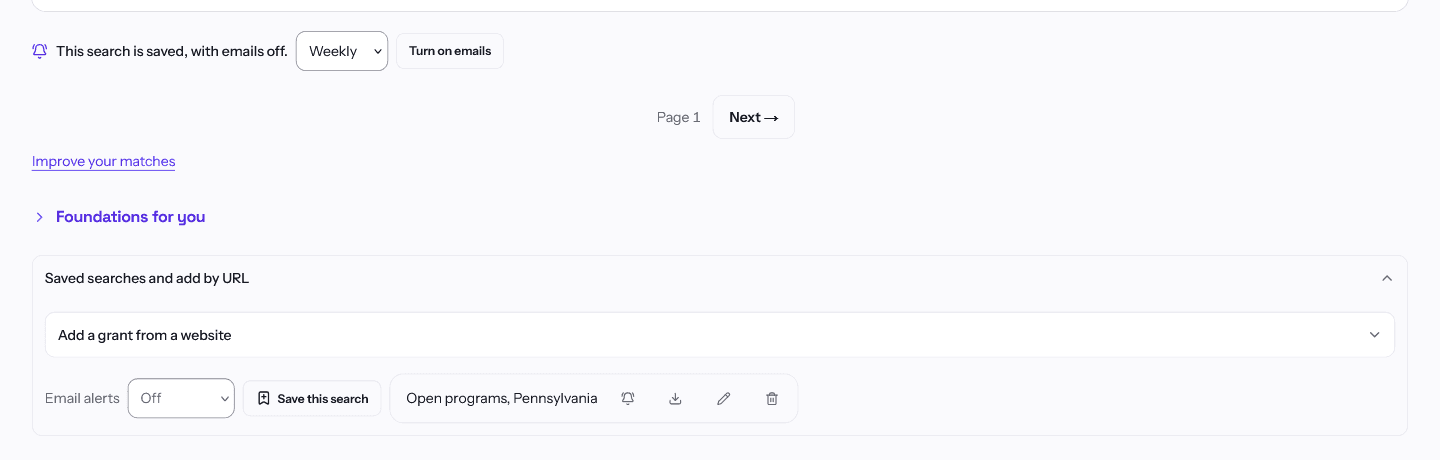
- Choose how often to get Email alerts for it (Off, Daily, Weekly or Real-time; it starts at Off), then choose Save this search. GrantCue keeps every filter you set.
- Your saved searches appear as buttons on Discover. Choose one to run it again.
Change how a saved search alerts you
- The bell on a saved search turns its alerts on or off.
- The frequency button cycles through daily, weekly and real-time.
- The pencil edits the name and description. The trash can deletes the search and removes its alerts too.
Build an alert without a saved search
Settings > Notifications has a Grant alerts section. Give the alert a name, then set a keyword, category or agency, pick a Frequency, choose where to Notify, and choose Add alert. Use the pencil on an existing alert to change it.
Slack and Microsoft Teams alerts need that integration connected first. See the article on integrations.
Related articles
Questions about a feature or a plan?Contact us