Grants Lifecycle Management: Running the Lifecycle With a Calendar and Software
A guide to grants lifecycle management in practice: the eight stages, a grant management process with owners and dates, a shared calendar, and what grant software must handle.
In this article (15)
- Quick Answer: How Do You Manage the Grant Lifecycle?
- Why Lifecycle Management Matters
- Grant Management Process
- Managing Each Stage in Practice
- Lifecycle Meeting Cadence
- Software Requirements for Lifecycle Management
- When To Move Beyond a Spreadsheet
- Federal Grant Lifecycle Context
- Lifecycle Handoff Points
- Lifecycle Operating Model
- Lifecycle Improvement Roadmap
- How AI Fits the Lifecycle
- Official guidance to check
- FAQ
- Next Step
Grants lifecycle management is the full process of finding grant opportunities, deciding whether to apply, writing and submitting proposals, managing awards, reporting results, closing out grants, and preparing for renewals. For nonprofits, the lifecycle matters because grant revenue does not end when the award letter arrives.
GrantCue helps teams manage the grant lifecycle by connecting discovery, pipeline tracking, deadlines, documents, AI writing, reporting, and post-award work. Its free plan covers one user and up to 10 tracked grants, and every new workspace starts with 14 days of Team with no card (grantcue.com pricing page, October 2026).
This guide covers running the lifecycle day to day: the process, the owners, a shared calendar and the software behind them. What each stage is and what it delivers is set out in grant lifecycle stages explained.
Quick Answer: How Do You Manage the Grant Lifecycle?
Manage the grant lifecycle by giving every grant one record, one named owner and a dated next action at each of its eight stages, from discovery to closeout and renewal. Put every application, report and closeout date on a shared calendar, review active applications weekly and awarded grants monthly, and use software once a spreadsheet stops keeping up.
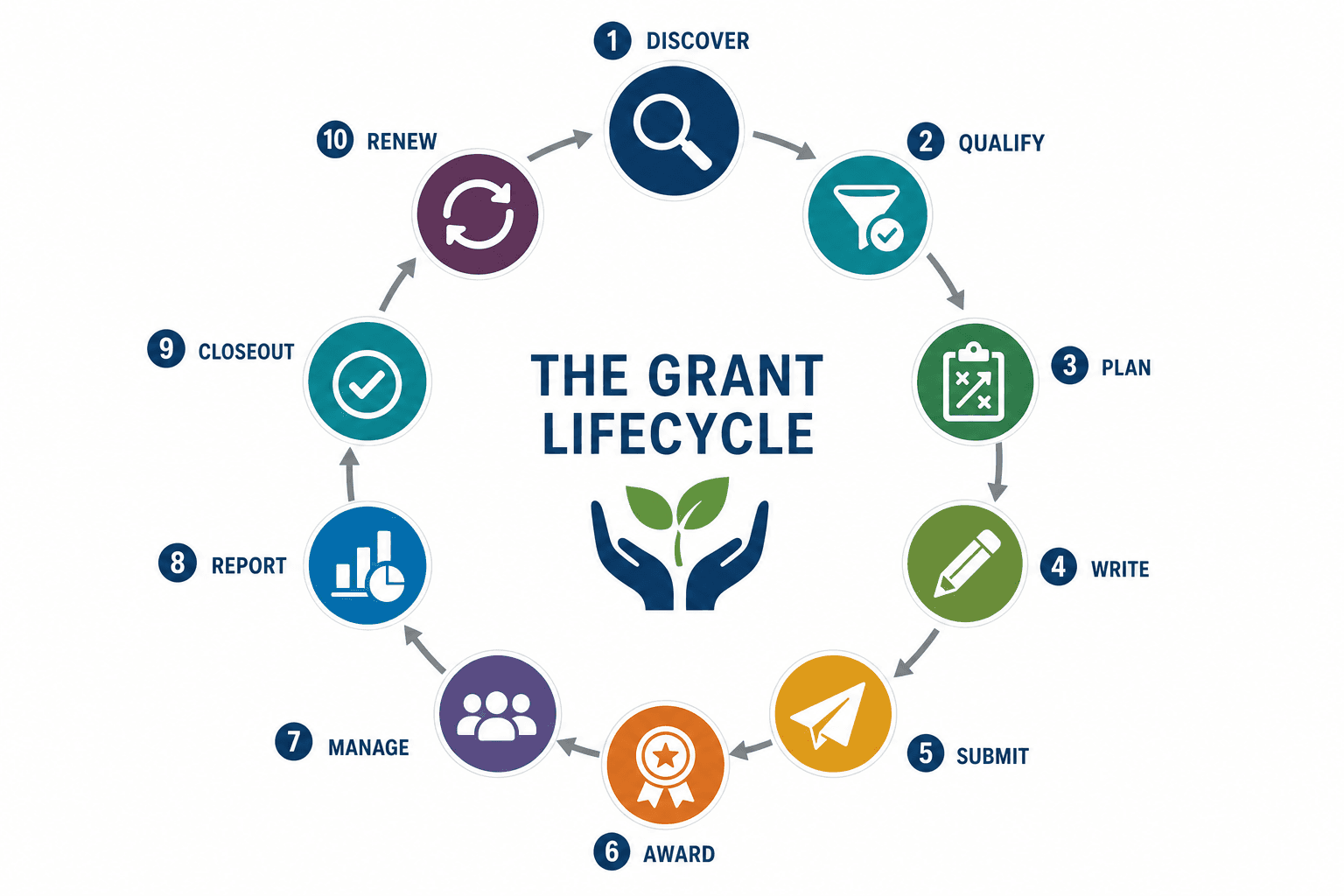
A grant moves through eight stages. Together they make up the grant cycle, which runs from the day an opportunity is found to the day the final record is archived.
The stages guide linked above also counts eight stages but divides the pre-award half differently: it puts finding and screening opportunities in one stage, makes the go or no-go call part of planning, and gives the funder's review a stage of its own, so the two lists match from award setup onward.
Stages 1 through 4 are pre-award. Stages 5 through 8 are post-award. Teams that lose grant money usually lose it at the seam between stage 4 and stage 5, where the proposal stops being a case for support and starts being a management plan.
Why Lifecycle Management Matters
Many nonprofits manage pre-award work separately from post-award work. The grant writer tracks applications, finance tracks spending, program staff track outcomes, and leadership asks for updates. That separation creates risk.
A lifecycle process reduces:
- Missed deadlines.
- Duplicate applications.
- Confusing document versions.
- Weak handoffs from proposal to program.
- Reporting surprises.
- Lost funder history.
- Renewal opportunities that slip away.
The goal is one continuous record from first discovery through final closeout.
Lifecycle discipline also protects the revenue mix: grants are one stream among several in a nonprofit funding model, and a pipeline that goes quiet strains every other stream.
Grant Management Process
The grant management process is the set of repeatable steps an organization uses to move a grant through the eight stages: who finds it, who decides to apply, who writes it, who owns the award, who reports on it, and who closes it out. The lifecycle describes what happens to the grant. The process describes what your team does about it.
Two organizations can follow the same lifecycle and get very different results, because the difference lives in the process: whether decisions get recorded, whether owners are named, and whether the next action carries a date.
A workable grant management process answers five questions at every stage:
- What is the record? The single place this grant lives.
- Who owns it? One named person, not a department.
- What is the next action? A verb, not a status.
- When is it due? A date on a shared calendar.
- What proves it happened? A document, a confirmation, or a submitted report.
The same shape appears under other names. Government settings call it the grant administration process. Larger institutions buying software call it end to end grants management or full grant lifecycle management. The vocabulary differs by sector. The steps do not.
Each step is laid out with an owner and an output in the grant management process guide.
Managing Each Stage in Practice
The eight stages need different habits. These are the records and decisions that keep each one moving.
Stage 1: Discovery
Discovery is the process of finding potential funders. A strong discovery process includes:
- Saved searches.
- Local and state funding sources.
- Foundation opportunities.
- Government notices.
- Funder history.
- Internal referrals from program staff.
- Eligibility filters.
Grant discovery should feed directly into the pipeline, not into a separate list that nobody checks.
For a dated count of what was open at one point in time, see the August 2026 grant funding snapshot.
Stage 2: Qualification
Qualification decides whether a grant deserves time. Use a short scorecard:
This is a natural place to use a grant lifecycle health check.
Stage 3: Planning
Planning turns an approved apply decision into a project the organization could actually run. It happens before drafting, not during it.
Confirm all of this before anyone writes a paragraph:
- The scope, including who is served and how many.
- The activities, and the staffing needed to deliver them.
- The budget assumptions, checked by whoever will sign the financial reports.
- The outcomes the organization is willing to be measured on.
- The partners, and whether they have agreed in writing.
- The internal due date, set at least three days before the funder's deadline.
- The attachments, and who is chasing each one.
Skipping planning is a common reason a proposal reads well and still loses. The narrative promises a program the budget cannot staff, or the outcomes were invented at the keyboard instead of agreed with the program team.
Stage 4: Proposal Development and Submission
Proposal development includes the narrative, budget, attachments, internal review, and final submission. It should connect to:
- The grant calendar and the grant pipeline.
- The proposal template and the grant proposal library of approved language.
- The budget owner.
- Required attachments.
- AI writing support.
- Review approvals.
Strong proposal work prepares the post-award phase. If the proposal promises outcomes, reporting methods, staffing, and budget categories, those details should become award management tasks if funded.
Stage 5: Award Setup
Award setup is the bridge between "we won" and "we can manage this." Capture:
- Award amount.
- Grant period.
- Restricted uses.
- Budget categories.
- Payment schedule.
- Reporting dates.
- Required metrics.
- Contacts.
- Grant agreement.
- Match requirements.
Do this immediately after award. Waiting until the first report is due creates unnecessary pressure. Compare the awarded budget with the requested one, because a smaller award changes what the program can deliver, and hold a kickoff with the program and finance owners.
Grant Summary
A grant summary is a one-page record that condenses an award into the facts anyone on the team might need without opening the agreement. Write it once at award setup and update it only when the funder approves a change.
A new staff member should be able to read the grant summary and handle a funder's phone call without escalating. That is the test.
Stage 6: Post-Award Management

Post-award management tracks whether the nonprofit is using funds correctly and delivering promised results. Use the post-award grant management checklist for a dedicated workflow.
At minimum, track:
- Spending against budget.
- Program activities.
- Participant counts.
- Outcomes.
- Required reports.
- Funder communications.
- Change approvals.
- Key documents.
Related guides for this stage: grant metrics and KPIs for choosing what to measure, the budget vs actual grant tracker template for the monthly spending check, and the grant expenditure tracking spreadsheet for the transaction log and audit trail behind it.
Stage 7: Reporting
Reporting is the stage where the organization proves it did what the proposal promised. Most awards require at least one interim report and one final report, and the schedule comes from the award agreement rather than from the recipient.
Reporting goes badly when data collection starts after the report date is announced. It goes well when the measures named in the proposal became tracked fields on the day the award was set up.
Track these for every report:
The grant reporting requirements guide includes a progress report template you can reuse across funders, plus the fields most agencies ask for. A fill-in version is also available as a grant progress report template.
Stage 8: Closeout and Renewal
Closeout completes the grant record. Use a grant closeout checklist to confirm:
- Final report submitted.
- Final expenses reconciled.
- Unspent funds resolved.
- Outcomes documented.
- Required records archived.
- Lessons learned captured.
- Renewal decision made.
Closeout deserves its own process because teams often discover missing records only after the funded work is over.
Renewal belongs in the same stage as closeout because the evidence for the next request is the evidence you just assembled for the final report. Decide within 30 days of closeout whether to reapply, and record the reason either way. A "no" with a reason is a useful record. Silence is not.
Lifecycle Meeting Cadence
Weekly: active applications and upcoming deadlines.
Monthly: awarded grants, reports, and leadership pipeline.
Quarterly: discovery strategy, renewals, closeouts, and process health.
Annually: grant revenue review, funder portfolio, proposal library refresh, and process improvement.
A small nonprofit may review the full grant lifecycle once a month with the executive director, grant lead, and finance owner. A mid-sized team may need a weekly pipeline review plus a separate monthly post-award review. A larger organization may separate discovery, proposal development, award management, and compliance meetings. The cadence matters less than consistency. Every active record should be reviewed often enough that deadlines, budget issues, and reporting obligations are visible before they become urgent.
For any team size, the meeting should end with three facts: who owns the next action, when it is due, and where the supporting record lives. Without those facts, the lifecycle is still living in conversation instead of in a system the organization can trust.
One Grant on the Calendar
A single grant stays on the calendar for well over a year. A nonprofit finds a state grant in March, qualifies it in April, drafts in May, submits in June, receives an award in September, starts the project in October, reports quarterly, submits a final report the next October and decides whether to reapply in November. Each of those dates goes on the shared calendar the day it becomes known, with an owner next to it.
What to Review
Track a few numbers at each review so the team can see whether the lifecycle is improving: opportunities qualified, opportunities declined before writing, applications submitted, award rate, pending request amount, awarded amount, reports submitted on time, closeouts completed and renewals identified.
Software Requirements for Lifecycle Management
Good grant management software for nonprofits should support both pre-award and post-award work.
If software stops at submitted applications, it does not support the full lifecycle. A pipeline view shows where each opportunity stands, and grant pipeline management covers the stages and dashboard behind it.
When To Move Beyond a Spreadsheet
A spreadsheet can work in the earliest stage of grants lifecycle management, but it usually starts to fail when the team needs reminders, file history, role assignments, reporting visibility, and reusable proposal content. The warning signs are easy to spot:
- Staff ask which version of the proposal is final.
- Finance does not see grant budgets until late in the process.
- Report dates are tracked separately from application deadlines.
- Award documents live in personal folders.
- The team cannot see all active grants by stage.
- Closeout depends on whoever remembers the details.
At that point, the issue is institutional memory as much as convenience. A dedicated grant management workflow helps the organization preserve decisions, documents, funder history, and reporting obligations across staff changes and busy seasons.
Software works best after the lifecycle model is clear. Tools are most valuable when the team already knows which stages, owners, and records it needs to manage.
If the team currently uses a spreadsheet, add lifecycle fields: stage, owner, next deadline, report dates, award amount, closeout status, documents link and next action. The grant tracking spreadsheet template for Excel lays out the columns and names the two limits that mark the point where a spreadsheet alternative pays off. Review the sheet weekly. If the lifecycle becomes too hard to manage manually, migrate into software.
Federal Grant Lifecycle Context
Federal grant guidance often describes a lifecycle that moves from pre-award to award to post-award and closeout. Nonprofits do not need to copy every federal process for every foundation grant, but the lifecycle model is useful because it reminds teams that the application is only one stage. Award management, reporting, records, and closeout are part of the same grant.
For federal awards, recipients should also be aware of the Uniform Guidance in 2 CFR Part 200 and the specific award terms. Closeout and record retention requirements can be detailed, and the funder or pass-through entity may have additional instructions. No checklist should replace the award agreement, NOFO, or official compliance guidance. Work through the federal grant compliance checklist once at award setup rather than once at audit, and the post-award stages get considerably quieter.
Subsidy Lifecycle Management
Subsidy lifecycle management is the same process viewed from the awarding side. Where a nonprofit manages one grant from discovery to closeout, a government body or funder manages a whole scheme: publishing the program, assessing applications, issuing awards, paying out, monitoring recipients, and auditing results. The term appears most often in public-sector and European funding contexts.
The two views share a spine, and every control the funder applies on their side becomes a requirement on yours. Their eligibility screening becomes your eligibility check. Their payment verification becomes your expense documentation. Their monitoring becomes your reporting schedule. Reading the process from the funder's side is a fast way to work out what evidence they will eventually ask you for.
Lifecycle Handoff Points
Handoffs create risk. Define them:
Discovery to qualification: opportunity is added and assigned.
Qualification to planning: team decides to apply.
Planning to drafting: project, budget owner, and timeline are defined.
Drafting to review: proposal and budget are ready for review.
Submitted to awarded: decision is received.
Awarded to reporting: report dates and restrictions are recorded.
Reporting to closeout: final reporting and records are prepared.
Each handoff should have a checklist.
Lifecycle Operating Model
Use a simple operating model:
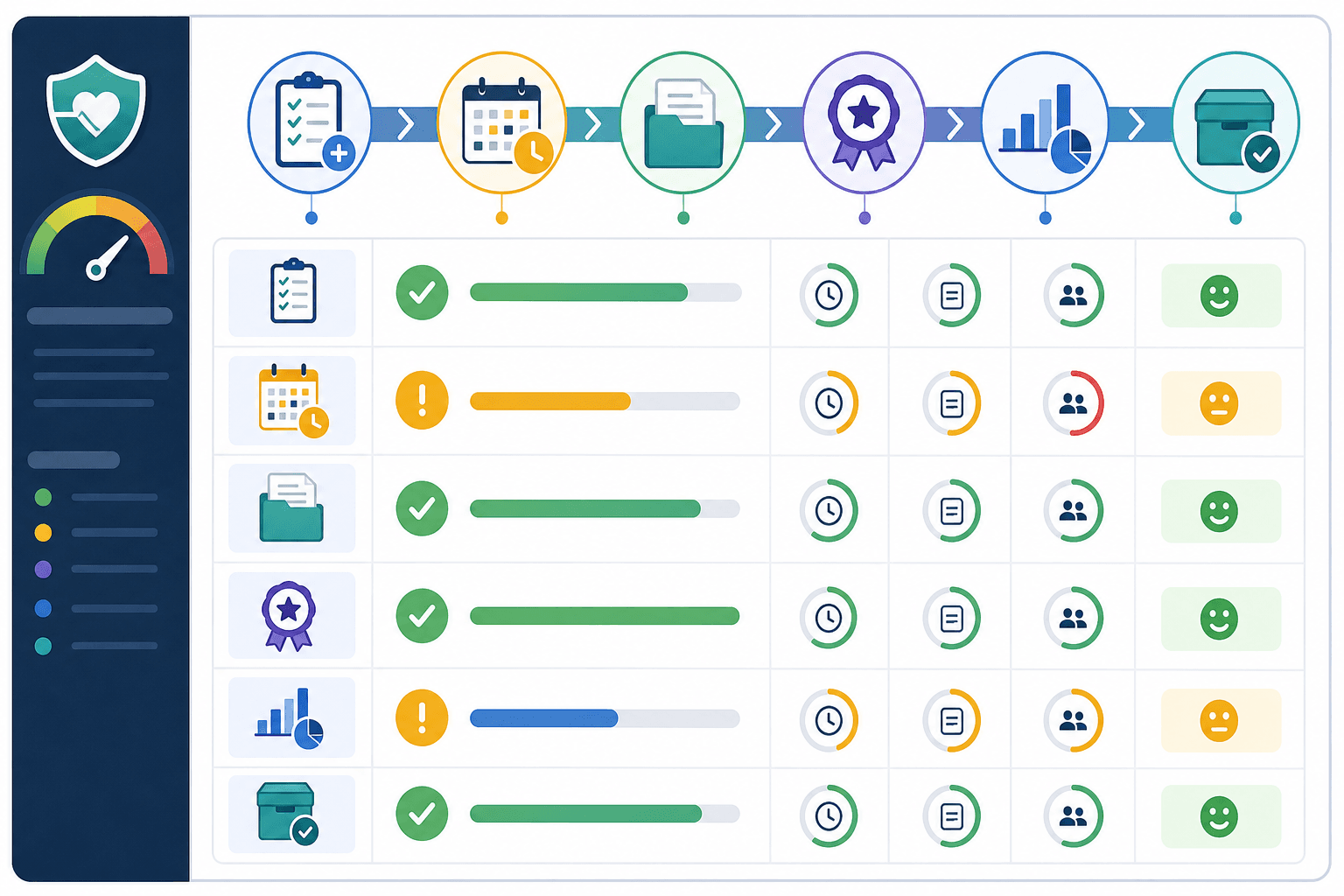
This table helps teams assign ownership across the full lifecycle.
Lifecycle Improvement Roadmap
Phase 1: centralize active grants and deadlines.
Phase 2: standardize proposal templates and review.
Phase 3: build post-award report tracking.
Phase 4: create proposal library and AI workflows.
Phase 5: add dashboards and lifecycle metrics.
This phased roadmap prevents teams from trying to fix every grant process at once.
How AI Fits the Lifecycle
AI can support several stages:
- Discovery: summarize opportunity descriptions.
- Qualification: extract eligibility and scoring criteria.
- Proposal: draft sections from verified facts.
- Review: compare drafts to requirements.
- Reporting: summarize outcomes and draft report language.
- Library: convert final language into reusable blocks.
AI should not decide eligibility, approve budgets, or submit reports without human review.
Official guidance to check
Grant lifecycle work deserves care because teams may be managing public funds, restricted private foundation awards, or federal pass-through grants. The workflow can explain the process, but teams still need to check the award agreement, the NOFO, the funder portal, and official guidance before making compliance decisions.
For federal awards, the lifecycle does not end when the program activity is finished. Uniform Guidance in 2 CFR Part 200 includes post-award, closeout, and record retention requirements. One practical example is record retention: 2 CFR 200.334 says federal award records are generally retained for three years from the final financial report submission date, with exceptions and extensions possible. That single rule changes how the lifecycle should be managed. A nonprofit should not treat closeout as "delete the folder and move on." It should keep the final report, budget documentation, supporting data, and correspondence in a durable archive.
For proposal development, official NIH writing guidance is a useful reminder even for non-NIH grant teams: goals should be realistic and clear, the application should be organized, and the language should be concise enough for reviewers to evaluate. Those points belong in the lifecycle because a messy discovery and qualification process usually produces a messy proposal. If the team did not confirm fit, outcomes, budget logic, and capacity before drafting, the final application has to carry too much uncertainty.
The goal is not to summarize every grant rule. The point is to give teams a dependable operating model:
- Use official sources for deadlines and compliance.
- Track each opportunity from first discovery through final archive.
- Make ownership visible.
- Connect proposal promises to post-award evidence.
- Keep reusable content in a proposal library.
- Feed closeout lessons back into the next search cycle.
That structure also helps staff train new team members because each stage has a clear owner, record, and next action.
FAQ
What is grants lifecycle management?
Grants lifecycle management is the end-to-end process of managing grants from discovery and application through award, reporting, closeout, and renewal.
What is the difference between pre-award and post-award management?
Pre-award management covers finding, qualifying, writing, and submitting grants. Post-award management covers award setup, spending, compliance, reporting, and closeout.
Why do nonprofits need grant lifecycle software?
Software helps teams keep deadlines, documents, tasks, funder notes, reports, and award requirements in one place instead of spreading them across spreadsheets, calendars, and email.
What are the stages of a grant?
A grant has eight stages: discovery, qualification, planning, proposal development and submission, award setup, post-award management, reporting, and closeout and renewal. The first four happen before the money arrives. The last four decide whether the funder gives again.
What is the grant cycle?
The grant cycle is the full loop a grant travels, from finding the opportunity through closing out the award and deciding whether to reapply. It is the same thing as the grant lifecycle. Funders sometimes use "grant cycle" to mean their own application rounds instead, so check which sense is meant when a funder mentions its next cycle.
What is the grant management process?
The grant management process is how a team executes the grant cycle: who owns each stage, what record each stage produces, and what the next action and due date are. A team without a defined process still has a grant cycle. It just discovers each stage late.
Next Step
If deadlines are the weak point, start with the grant pipeline guide, which ties each stage to its calendar dates. If the team is unsure where the process breaks, run a grant lifecycle health check. If awards are difficult to manage after approval, use the post-award grant management checklist and the grant closeout checklist. Teams that need one shared system can compare requirements in the grant management software for nonprofits guide.