Best Software for Grant Writing: Free and Paid Tools Compared
The best software for grant writing, compared by job: word processors, proposal libraries, AI drafting tools and trackers, with dated prices, the free no-cost stack, and AI safeguards.
In this article (32)
- Quick Answer: What Is the Best Software for Grant Writing?
- Best Software for Grant Writing, by Job
- AI Policy and Disclosure Considerations
- What Is AI Grant Writing Software?
- When a Free AI Grant Writer Helps Most
- Recommended AI Grant Writing Workflow
- What to Put Into an AI Grant Writer
- Best Sections to Draft With AI
- Prompt Template for AI Grant Writing
- How AI Content Should Be Reviewed
- Free vs Paid AI Grant Writing Tools
- Safe AI Grant Writing Principles
- Best AI Grant Writing Use Cases
- AI Prompt Library for Grant Teams
- Human Review Workflow
- Proposal Library and AI
- AI Grant Writing Decision Tree
- AI Risk Register
- When Not To Use AI
- How To Evaluate AI Grant Writing Software
- Prompting Rules
- Example AI-Assisted Proposal Section
- AI Grant Writing Operating Policy
- AI Workflow by Proposal Section
- AI Output Scoring Rubric
- Common AI Grant Writing Mistakes
- Complete AI Grant Writing Example Workflow
- AI Grant Writing Maturity Levels
- Keep AI Inside Your Grant Workflow
- Before You Adopt AI Grant Writing
- FAQ
- Next Step: Summarize One NOFO Before You Draft
The best software for grant writing is rarely one product. A working setup combines a word processor, a place to keep approved language, an AI drafting tool and a tracker for deadlines, and the free tiers of those tools carry a one-person program a long way. A free AI grant writer fits that stack as long as it drafts from verified facts and gets no confidential text.
AI can help a grant team move faster, but it does not replace grant strategy, eligibility review, program design or human judgment. Its practical uses are summarizing funder instructions, organizing requirements, drafting first-pass language, improving clarity and checking whether a proposal answers the funder's questions.
Quick Answer: What Is the Best Software for Grant Writing?
The best software for grant writing is a small stack chosen by job: a word processor your team already has, a shared library of approved language, an AI drafting tool used only on verified facts, and a tracker for deadlines. Free tiers cover one writer; pay when several people share drafts or the AI must handle confidential material.
Best Software for Grant Writing, by Job
Grant writing software is best judged by the job it does, because no single tool covers drafting, approved language, AI help and deadlines equally well. The table lists the common choice for each job, what it cost on the vendor's own page, and where it stops (vendor pricing pages, September and October 2026).
How to Choose: Five Criteria
Choose by five criteria, in this order:
- Where your team already writes. If the organization runs on Microsoft 365 or Google Workspace, the word processor and shared drive are already paid for. Eligible nonprofits can get Google Workspace for Nonprofits at "$0 USD / user / month" (Google for Nonprofits, September 2026), though Google answers "No" when asked whether a nonprofit school, healthcare organization or government entity is eligible.
- Who edits at the same time. Two writers and a finance reviewer on one draft need the file in the cloud: Microsoft says version history for Office files "only works for files stored in OneDrive or SharePoint in Microsoft 365" (Microsoft Support, September 2026).
- Where approved language lives. A grant proposal library of mission text, program descriptions and budget narratives is what makes AI drafting accurate.
- What the AI tool does with your text. Training and retention terms differ by provider and by account type; check them before anything confidential goes in.
- Price for your number of writers. ChatGPT Business is priced per seat with a two-seat minimum (OpenAI, October 2026), while Grantable says its plans carry "no per-seat fees" (Grantable pricing page, October 2026).
The Free No-Cost Stack
A one-person grant program can run on free tools: a nonprofit-donated word processor and shared drive, a folder of approved boilerplate as the proposal library, the free version of a general AI assistant for summaries and first drafts of non-confidential text, Grants.gov for federal opportunities (free to search with no subscription; Grants.gov, September 2026), and a spreadsheet tracker. Grantable's free plan adds a grant-specific option with "5 chat messages a day" and file imports up to 10 MB (Grantable pricing page, October 2026). The free grant proposal software guide compares the free tools in more depth, and the best grant finder guide covers the search side.
When Paying Makes Sense
Pay when the free stack starts to cost time: several writers editing the same drafts, deadlines that need reminders, or AI work on confidential material that calls for a business plan or a grant tool whose data terms you have read. Grant-specific tools also price differently. Grantable lists 50 percent off paid plans for a year for 501(c)(3) organizations with annual operating budgets under $500K (Grantable pricing page, October 2026), and Grant Assistant says its "pricing is customized based on organization size and grant program scope" (Grant Assistant FAQ, October 2026).
AI Policy and Disclosure Considerations
Two sets of rules govern AI in grant writing: the AI provider's data terms for the account you use, and the funder's rules for the application. Check both before choosing a drafting tool.
Provider Terms Depend on the Account Type
OpenAI states that "When you use our services for individuals such as ChatGPT and Codex, we may use your content to train our models," while "By default, we do not train on any inputs or outputs from our products for business users, including ChatGPT Business, ChatGPT Enterprise, and the API" (OpenAI Help Center, September 2026). A personal-plan user can turn off "Improve the model for everyone" in Data Controls (OpenAI Help Center, September 2026). Google's notice for personal Gemini use asks: "Please don't enter confidential information that you wouldn't want a reviewer to see or Google to use to improve our services" (Google, Gemini Apps Privacy Notice, June 2026). Microsoft uses consumer Copilot conversations for training "Except for certain categories of users or users who have opted out," while organizational prompts and responses "aren't used to train foundation LLMs" (Microsoft, August 2026).
Grant-specific vendors make their own statements. Grantable says "Your content is never used to train AI models," and Grant Assistant says it "does not use your data to train or improve general language models" (vendor pages, read September and October 2026); treat both as vendor claims and check the contract. In one Reddit thread on AI and grant drafts, one commenter said they "omit details that are proprietary like names, organization, structure of the organization," and another warned "You could be violating privacy by uploading it to ChatGPT unless it's a non-training version" (Reddit thread 1ubd86x, read September 2026). The ChatGPT for grant writing guide covers that tool in detail.
Funder Rules Differ
Funder rules on AI differ, so name the funder every time. NIH states that it "will not consider applications that are either substantially developed by AI, or contain sections substantially developed by AI, to be original ideas of applicants," while also saying AI "may be appropriate to assist in application preparation for limited aspects or in specific circumstances" (NIH notice NOT-OD-25-132, July 2025). NSF says "Proposers are encouraged to indicate in the project description the extent to which, if any, generative AI technology was used" and prohibits its reviewers from uploading proposal content "to non-approved generative AI tools" (NSF notice, December 2023). NEH requires applicants to acknowledge inserted AI-generated text "by use of footnotes or other marginal notations" (NEH policy, October 2024).
Even if a nonprofit is not applying to a federal agency, those policies point to a broader rule: do not put confidential funder, applicant or participant information into a tool unless the organization understands its privacy terms. Use this internal checklist:
- Did the funder mention AI?
- Does the application require disclosure?
- Are any materials confidential?
- Are participant details removed or anonymized?
- Are citations and data verified?
- Did a human approve the final text?
What Is AI Grant Writing Software?
AI grant writing software is software that helps a grant team draft, revise, summarize and review grant content. It can assist with executive summaries, statements of need, goals and objectives, evaluation plans, budget narratives, letters of intent and final review checklists.
When a Free AI Grant Writer Helps Most
An AI grant writer is most useful when the team already knows the project, population, funding request and expected outcomes. AI works best with source material. It works poorly when asked to invent a program from nothing.
Use AI for:
- Summarizing a long NOFO into an application brief.
- Drafting a first version of a proposal section.
- Turning bullet notes into a polished narrative.
- Rewriting a section to match a funder word limit.
- Checking whether every required question was answered.
- Creating an internal review checklist.
- Converting a past proposal into a reusable template.
Do not use AI to invent community data, fabricate partnerships, guess budget numbers, or create results your nonprofit cannot measure.
Recommended AI Grant Writing Workflow
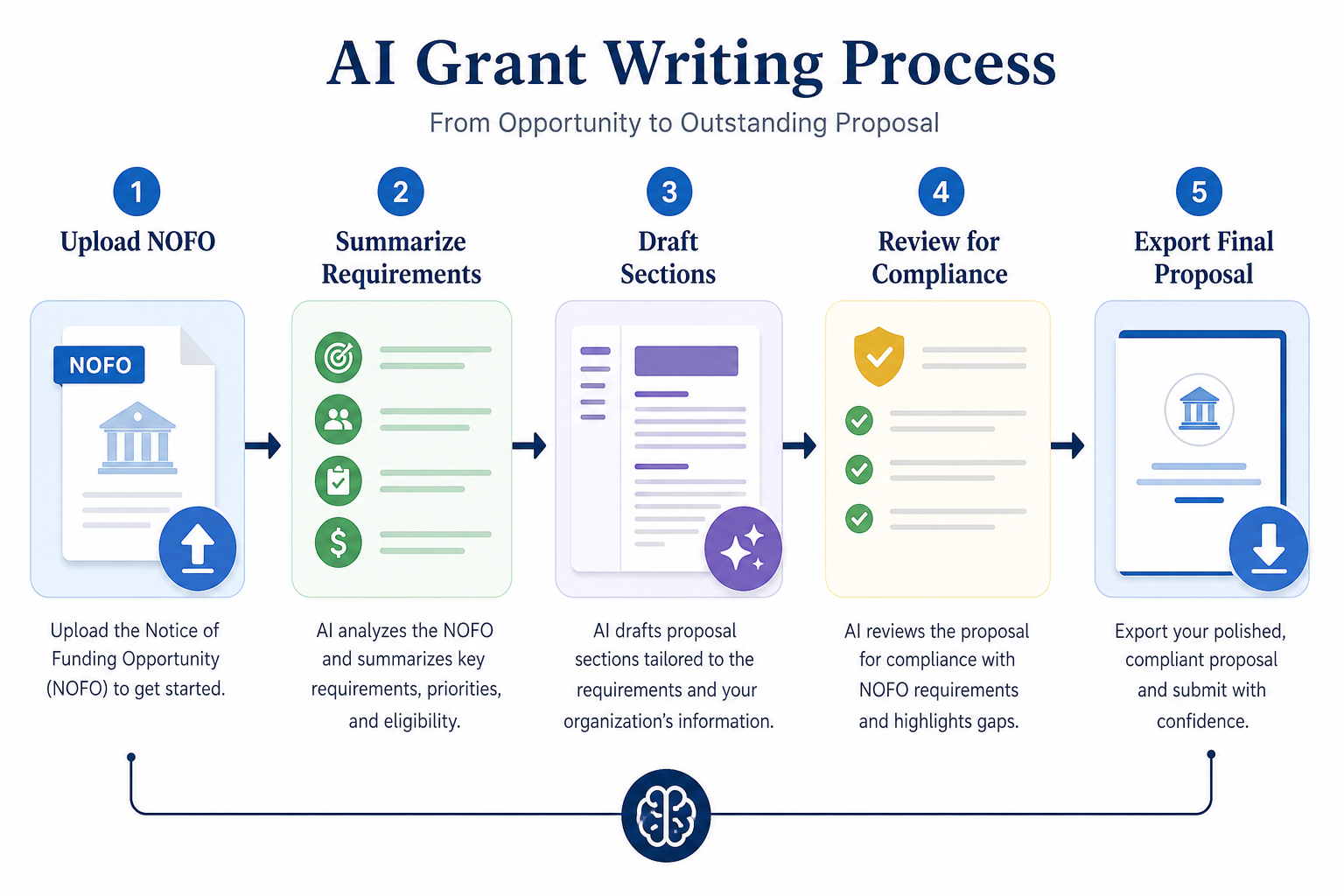
The safest workflow has six steps:
- Save the grant opportunity in your pipeline.
- Use an AI NOFO summarizer to extract eligibility, deadlines, attachments, scoring criteria and narrative questions.
- Gather source documents: program plan, budget, prior outcomes, letters, staff bios and organizational background.
- Draft each section from verified inputs.
- Run a grant proposal review checklist before submission.
- Store final approved language in the proposal library for future reuse.
This workflow keeps AI inside the grant process instead of treating it as a separate writing toy. Funders evaluate fit, compliance, evidence, credibility and sentence quality together.
What to Put Into an AI Grant Writer
The quality of AI output depends on the inputs. Before drafting, prepare:
Ask the AI to use only the facts provided, then review every statement before submission.
Best Sections to Draft With AI
AI can support most proposal sections, but some are better fits than others.
For the full proposal structure, pair this workflow with the complete grant proposal template.
Prompt Template for AI Grant Writing
Use a structured prompt like this:
You are helping draft a nonprofit grant proposal.
Use only the facts provided below.
Do not invent data, partners, outcomes, budget numbers, or citations.

Funder:
[Funder name]

Grant opportunity:
[NOFO summary or instructions]

Proposal question:
[Paste the exact question]

Word limit:
[Word limit]

Organization facts:
[Mission, service area, credibility]

Project facts:
[Activities, population, location, timeline, staffing]

Budget facts:
[Request amount and major cost categories]

Outcomes:
[Outputs, outcomes, evaluation method]

Draft a clear, funder-ready response.
After the draft, list any missing facts that a human must verify.
This prompt asks for both a draft and a gap list. The gap list is often more valuable than the prose.
How AI Content Should Be Reviewed
Every AI-assisted proposal needs a human review pass. At minimum, check:
- Eligibility is accurate.
- Deadline and submission method are correct.
- The proposal answers every required question.
- Every number, name, date and data point has a real source.
- Budget numbers match finance records.
- Outcomes are measurable.
- Partner names and commitments are current.
- No citation, statistic or commitment was invented.
- The tone sounds like your organization and avoids generic filler.
- Final text fits word and page limits.
A reviewer should be able to trace each important sentence back to the NOFO, program facts, budget or approved language that shaped it; if a sentence cannot be traced, revise it or remove it. The submitting organization is responsible for the final application.
Free vs Paid AI Grant Writing Tools
Free general AI tools can draft and summarize, but they do not know your pipeline, deadlines, funder history, award records or proposal library. Paid grant-specific tools are more useful when they connect AI to grant records, documents, deadlines, reusable language and team workflows.
If your team is only testing AI, free tools may be enough. If grant work is a recurring revenue function, a grant management platform that includes AI keeps the writing next to the deadlines. Our grant management software for nonprofits comparison covers the options.
Safe AI Grant Writing Principles
AI grant writing should follow five principles:
- Source-grounded: AI drafts from real organization facts, funder instructions, budgets and program details.
- Human-reviewed: staff verify every claim, number, partner and outcome.
- Funder-compliant: the team follows the funder's rules about AI use, disclosure, plagiarism and originality.
- Reusable: approved final language is stored in a proposal library for future applications.
- Auditable: the team can identify where important facts came from.
These principles prevent the most common AI failure: fluent text that sounds plausible but cannot be verified.
Best AI Grant Writing Use Cases

AI Prompt Library for Grant Teams
NOFO Extraction Prompt
Extract the following from this NOFO:
eligibility, deadline, award range, match, project period, narrative questions,
attachments, scoring criteria, budget rules, reporting requirements, and open
questions for human review. Use only the NOFO text.
Proposal Section Prompt
Draft a response to the funder question below using only the organization and
project facts provided. Do not invent data, partners, outcomes, or budget
details. If information is missing, list it after the draft.
Reviewer Prompt
Review this proposal against the funder requirements. Identify missing,
weak, inconsistent, or noncompliant items. Do not rewrite yet.
Word Limit Prompt
Shorten this section to [word limit] while preserving the funding request,
population, activities, outcomes, and required funder terms.
Human Review Workflow
Use a four-pass review:
- Compliance review: does the draft answer every required question?
- Accuracy review: are all facts, amounts, outcomes and partners correct?
- Strategy review: does the proposal fit the funder and make a strong case?
- Style review: is the writing clear, concise and consistent?
AI can help with each pass, but humans own the decision. The grant writer may lead style and compliance. Program staff should verify activities and outcomes. Finance should verify budget language. Leadership should approve commitments.
Proposal Library and AI
AI performs better when the team has a proposal library. A library gives the AI approved language and facts:
- Mission and history.
- Program descriptions.
- Outcomes.
- Evaluation language.
- Budget narratives.
- Staff bios.
- Partner descriptions.
- Prior successful proposals.
Without a library, AI produces generic text. With a library, it can adapt real organizational language to new funder questions.
AI Grant Writing Decision Tree
Use this decision tree before drafting:
AI should never be used to compensate for an apply or no-apply decision the team has not made.
AI Risk Register
When Not To Use AI
Do not use AI when:
- The funder prohibits it.
- The application contains confidential data the tool should not receive.
- The team has no time for human review.
- Budget or outcome numbers are not verified.
- Partner commitments are not confirmed.
- The project design is still undecided.
- The team is asking AI to invent evidence.
In those cases, use AI only for internal planning or not at all.
How To Evaluate AI Grant Writing Software
Ask:
- Does it summarize NOFOs?
- Does it draft from saved organization facts?
- Does it help build checklists?
- Does it connect to deadlines?
- Does it store proposal language?
- Does it support review workflows?
- Can humans edit and approve?
- What do its terms say about training on and retaining your content?
- Does it export content?
- Does it fit the full grant workflow?
- Does it avoid encouraging unsupported claims?
The best software feels like a grants assistant inside the workflow, not a separate chatbot.
Prompting Rules
Use prompts that define:
- Role.
- Funder question.
- Word limit.
- Source facts.
- Prohibited behavior.
- Output format.
- Missing-information list.
Bad prompt: "Write a grant proposal for our youth program."
Better prompt: "Draft a response of no more than the funder's word limit to the project description question using only the facts below. Do not invent data. Preserve the request amount, project period, population, activities, and outcomes. After the draft, list missing information."
Example AI-Assisted Proposal Section
Source facts:
- Organization serves 300 rural students annually.
- Project will provide after-school tutoring at two schools.
- Request is $75,000.
- Grant period is 12 months.
- Expected result is 80 students improving by at least one reading level.
Illustrative figures, not data from a real organization.
AI-assisted draft:
"Example Rural Literacy Partners (composite) requests $75,000 to expand after-school literacy tutoring for students in two rural elementary schools. During the 12-month grant period, the project will provide small-group tutoring, caregiver workshops, and take-home reading materials for students performing below grade level. Grant funds will support part-time tutors, curriculum materials, transportation assistance, and evaluation. By the end of the project, at least 80 participating students are expected to improve by one or more reading levels as measured by district benchmark assessments."
Human review questions:
- Is the amount correct?
- Are the schools eligible?
- Is the reading-level measure real?
- Does the budget include every activity?
- Does the funder want this format?
AI Grant Writing Operating Policy
Use a simple internal policy:
"AI tools may be used to summarize grant instructions, draft first-pass language from approved source material, improve clarity, and support review. AI may not be used to invent facts, statistics, budget numbers, partner commitments, citations, or outcomes. Every AI-assisted proposal section must be reviewed by the responsible human owner before submission."
This policy is short enough to use and strong enough to prevent most misuse.
AI Workflow by Proposal Section
In every section, AI assists; a human owner still signs off.
AI Output Scoring Rubric
Score AI output before using it:
Most AI first drafts land in the middle of that scale, and that is fine. The goal is not instant final copy; the goal is faster movement from notes to a reviewable draft.
Common AI Grant Writing Mistakes
Avoid:
- Asking AI to write without source facts.
- Using AI-generated statistics.
- Letting AI change budget commitments.
- Reusing AI text without funder fit.
- Ignoring word limits.
- Skipping human review because the text sounds polished.
- Treating AI as a grant strategist.
The text may be fluent even when the proposal is weak. Review for substance first.
Complete AI Grant Writing Example Workflow

Day 1: the grant writer saves the opportunity and runs a NOFO summary. The summary extracts deadline, eligibility, scoring criteria, required attachments, budget rules and reporting requirements.
Day 2: the team makes an apply or no-apply decision. Program staff confirm the project, finance confirms the budget range, and leadership confirms strategic fit.
Day 3: the grant writer creates a source packet with organization background, program facts, need data, outcomes, budget lines and funder questions.
Day 4: AI drafts first-pass responses for the executive summary, project description, goals and budget narrative. The AI also lists missing facts.
Day 5: humans review. Program staff edit activities and outcomes. Finance edits budget language. The grant writer checks funder fit and style.
Day 6: AI reviews the revised draft against the funder requirements and creates a gap list.
Day 7: the team resolves gaps, completes attachments and prepares the final submission.
AI is useful here because the process is structured. It is not a shortcut around planning; it is a speed layer inside planning.
AI Grant Writing Maturity Levels
Most nonprofits should reach level 3 or 4 before relying heavily on AI-assisted drafting.
Keep AI Inside Your Grant Workflow
Use AI as part of a grant management system, not as a separate shortcut. The workflow that holds up is: find the grant, summarize the NOFO, qualify fit, gather source facts, draft with AI, review with humans, submit, save final language, and track reports after award.
GrantCue sells one of the tools in this category, and it keeps that loop in one place: discovery, a kanban pipeline with deadline reminders, AI NOFO summaries (3 a month on the Free plan, unlimited from Essentials), AI writing tools from Essentials at $49 a month, and the proposal assistant from Team at $109 a month (GrantCue pricing page, October 2026). The pricing page shows which AI tools each plan includes.
Before You Adopt AI Grant Writing
Before adopting AI grant writing:
- Create approved organization facts.
- Create a proposal library.
- Define who may use AI.
- Define what data may not be pasted into AI.
- Create standard prompts.
- Require human review.
- Save final approved language.
- Track which proposals used AI assistance in case a funder asks for disclosure.
AI will not make a weak project fundable, but it can help a strong project become clearer faster. The best results come when AI is paired with good grant strategy, accurate data, a realistic budget and a disciplined review process.
FAQ
Do I need paid software to write grants?
No. A one-person program can write grants with a donated or existing word processor, a shared folder of approved language, the free version of a general AI assistant for non-confidential drafting, and a spreadsheet tracker. Paid tools earn their cost when several people share drafts, deadlines need reminders, or AI must work on confidential material under a business plan or a grant tool whose data terms you have read.
Can AI write an entire grant proposal?
AI can draft large parts of a grant proposal, but a nonprofit should not submit AI-generated text without human review. Some funders go further: NIH states that it will not consider applications substantially developed by AI, or with sections substantially developed by AI, to be the applicants' original ideas (NIH notice NOT-OD-25-132, July 2025). Verify facts, budget numbers, eligibility, partner commitments and outcomes yourself.
Is free AI grant writing software enough?
Free AI tools can help with drafting, summarizing and editing, and they are enough for a team testing AI on non-confidential material. Grant-specific software becomes more useful when the team needs to track deadlines, store documents, reuse approved language and review proposals against funder requirements, or when its data terms matter more than the price.
What is the biggest risk of using AI for grants?
The biggest risk is submitting inaccurate or generic content. AI may invent statistics, partners or citations when the prompt does not restrict it to verified source material, and the text can read fluently even when it is wrong. The control is simple: supply the facts, ask for a list of missing information, and check every number and name before submission.
How should nonprofits disclose AI use?
Follow each funder's own rule, because they differ. NSF encourages proposers to indicate in the project description how generative AI was used (NSF notice, December 2023), and NEH requires footnotes or marginal notes where AI-generated text was inserted (NEH policy, October 2024). If a funder says nothing, keep an internal record of which sections used AI so you can answer if asked.
What should AI never do in a grant proposal?
AI should never invent statistics, citations, budgets, partners, eligibility or outcomes. It should also never receive confidential participant data or a funder's confidential material through an account whose terms allow training on your content. Use it to summarize, organize, draft from verified facts and check for missing requirements, and leave strategy and commitments to people.
Next Step: Summarize One NOFO Before You Draft
If you are evaluating a real grant today, start with the AI NOFO summarizer step to decide whether to apply, then build the source packet before any drafting. First-time writers should begin with the beginner grant writing guide, and teams with a full draft should run it through the review checklist before they submit.