Grant Tracking Spreadsheet Alternative: Why Nonprofit Teams Move to Software
A guide to why nonprofit grant teams outgrow spreadsheets and what to use instead for deadlines, documents, pipeline visibility, and reporting.
Last updated: July 2026
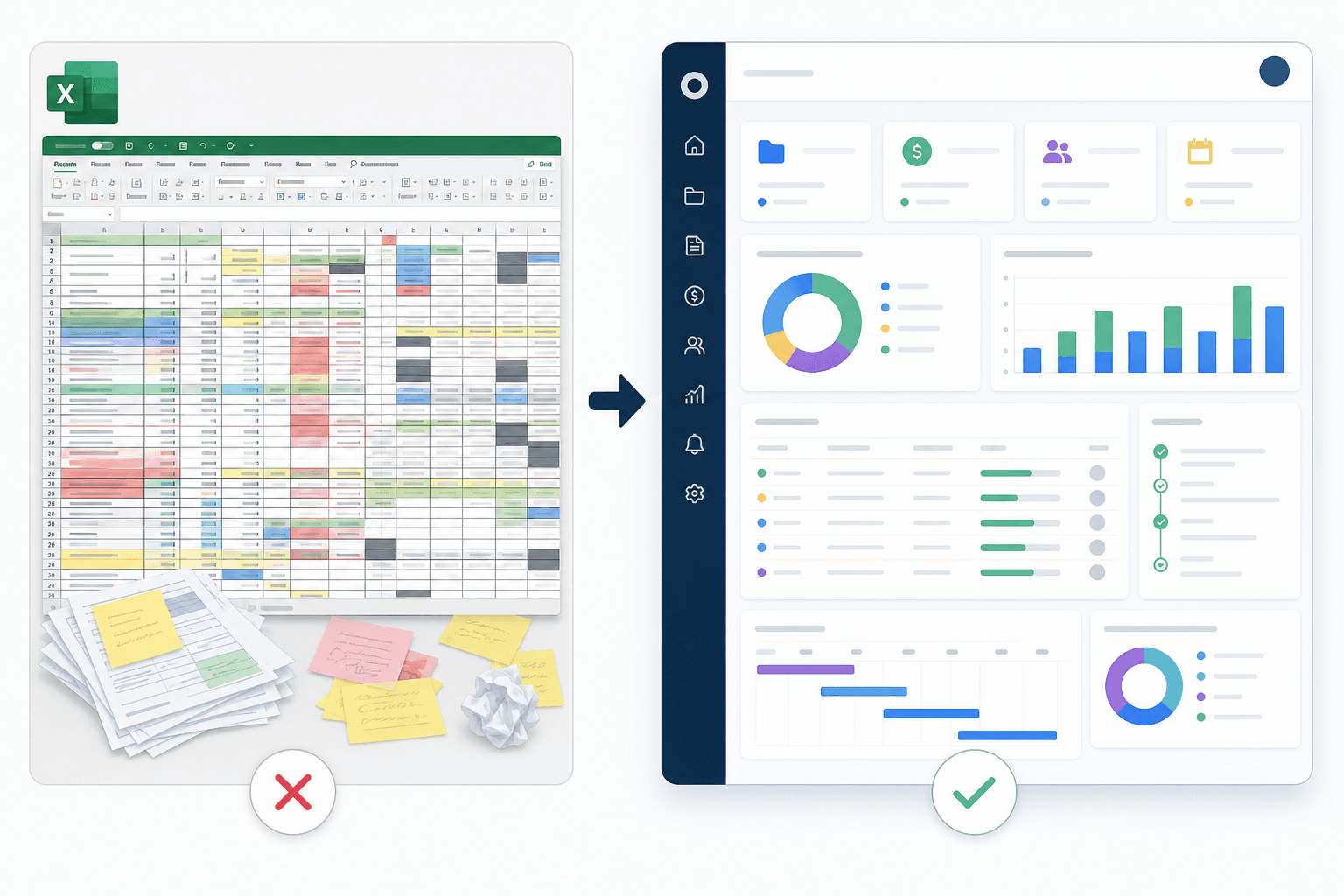
A grant tracking spreadsheet can work for a small team with a few opportunities. It becomes risky when multiple people manage deadlines, documents, proposals, awards, and reports. A grant tracking spreadsheet alternative gives nonprofits pipeline visibility, reminders, task ownership, document links, and leadership reporting.
The natural next step is grant management software for nonprofits.
Quick Answer: When Should You Replace a Grant Spreadsheet?
Replace the spreadsheet when:
- More than one person owns grant work.
- Deadlines are being missed or double-checked manually.
- Documents are scattered.
- Notes are buried in email.
- Leadership asks for frequent updates.
- Award reports are tracked separately.
- The team needs a grant calendar.
Why Spreadsheets Start Strong
Spreadsheets are familiar, flexible, and cheap. They are good for:
- A temporary tracker.
- A small number of grants.
- Simple lists.
- Export cleanup.
- Early-stage planning.
If you need a starter format, use the grant tracking spreadsheet template.

Why Spreadsheets Break
Spreadsheets struggle with:
- Reminders.
- Permissions.
- Document history.
- Assignments.
- Comments.
- Pipeline stages.
- Reporting.
- Post-award tasks.
- Data consistency.
The more grants your team manages, the more manual maintenance the spreadsheet requires.
What Software Adds
| Need | Spreadsheet | Software |
|---|---|---|
| Deadline reminders | Manual | Automated |
| Ownership | Text cell | Assigned user |
| Pipeline stages | Filter or color | Visual board |
| Documents | Links | Connected records |
| Reports | Manual | Dashboard |
| Collaboration | Fragile | Built for teams |
Migration Checklist
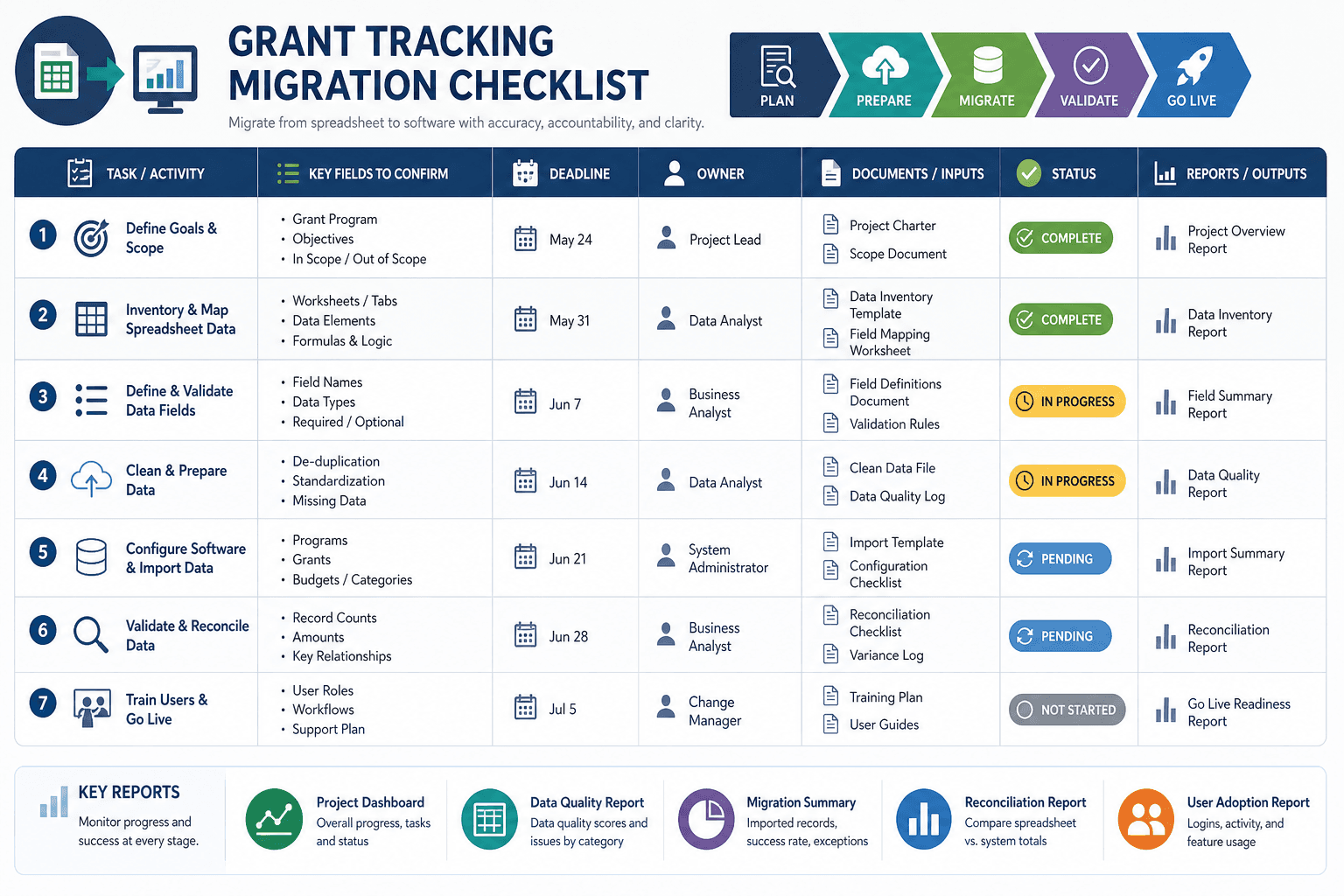
Before moving from spreadsheet to software:
- Remove duplicate grant records.
- Standardize funder names.
- Clean dates.
- Normalize statuses.
- Add owners.
- Identify active grants.
- Archive stale records.
- Confirm document links.
- Import active records first.
Why Spreadsheets Feel Good at First
Spreadsheets are familiar. They are flexible, free or inexpensive, and easy to start. A one-person grant writer can create columns for funder, deadline, amount, status, and notes in an afternoon. For a small pipeline, that may be enough.
The problem is not that spreadsheets are bad. The problem is that they do not naturally enforce a grant workflow. They do not know the difference between an application deadline and a report deadline. They do not know whether a note is current. They do not prevent duplicate funders. They do not ensure a budget is reviewed before submission.
Hidden Costs of Grant Spreadsheets
| Hidden Cost | Example |
|---|---|
| Manual updates | Someone must update every date and status |
| Version confusion | Staff edit different copies |
| Weak reminders | Deadlines rely on people checking the sheet |
| Lost context | Documents live somewhere else |
| Reporting labor | Leadership reports are built manually |
| No activity history | Hard to know who changed what |
| Weak post-award tracking | Reports and restrictions are easy to miss |
These costs grow slowly. By the time the spreadsheet is painful, the team may already depend on it.
Signs You Need an Alternative
Move beyond spreadsheets when:
- More than one person updates grants.
- Deadlines are missed or nearly missed.
- Awarded grants need reports.
- Documents are hard to find.
- Leadership asks for pipeline updates.
- You track the same grant in multiple places.
- You use color coding no one understands.
- You need grant discovery.
- You want AI proposal support.
- You cannot tell which records are current.
These are operational signals, not software preferences.
What Software Should Replace
A true alternative replaces several spreadsheet-adjacent tools:
- Grant tracker.
- Deadline calendar.
- Document index.
- Funder notes file.
- Proposal status report.
- Award report tracker.
- Renewal reminder list.
- Manual leadership dashboard.
If a tool replaces only the table, the team may still be stuck with the same coordination work.
Migration Path From Spreadsheet to Software
- Save a backup copy.
- Remove duplicate rows.
- Standardize funder names.
- Standardize statuses.
- Convert dates to real date fields.
- Separate active, awarded, declined, and archived records.
- Add missing owners.
- Verify upcoming deadlines.
- Import only useful fields.
- Review records after import.
Do not import bad data just to move quickly. A cleaner import saves more time.
What to Keep in a Spreadsheet
Even after moving to software, a spreadsheet can still be useful for:
- One-time cleanup.
- Board exports.
- Finance reconciliation.
- Historical archive.
- Custom analysis.
But it should not remain the primary source of truth for active grants.
Spreadsheet or Software?
Use a spreadsheet while the grant operation is small and simple. Move to grant management software for nonprofits when the work becomes collaborative, deadline-heavy, report-heavy, or strategically important.
Spreadsheet Risk Assessment
Score each item from 0 to 2:
| Risk Area | 0 | 1 | 2 |
|---|---|---|---|
| Number of users | One user | Two users | Three or more users |
| Active grants | Under 10 | 10 to 25 | More than 25 |
| Awarded reports | Few | Some | Many |
| Deadline complexity | Simple | Moderate | Complex |
| Document organization | Clean | Mixed | Scattered |
| Leadership reporting | Rare | Monthly | Frequent |
If the score is 8 or higher, the spreadsheet is probably creating operational risk.
Transition Plan
Do not switch overnight without cleanup:
- Freeze spreadsheet structure.
- Decide which columns become software fields.
- Clean active records.
- Import a small test batch.
- Review date and status mapping.
- Import remaining active records.
- Archive old records.
- Train users.
- Stop updating the old sheet.
The last step matters. If the old sheet stays active, the team will split the source of truth.
How AI Changes the Spreadsheet Decision
AI grant writing is more useful when it has structured grant data, source documents, and reusable language. A spreadsheet can store links, but it does not naturally connect a NOFO summary, proposal draft, budget, deadline, and review checklist. If the team wants AI-assisted grant writing, a software workflow is usually stronger than a spreadsheet plus a separate chat tool.
Spreadsheet Alternative Business Case
A simple business case can help leadership approve software:
"Our current grant spreadsheet tracks opportunities but does not reliably manage ownership, report dates, documents, or leadership visibility. As the grant pipeline grows, staff time is being spent maintaining the spreadsheet, creating manual reports, and searching for files. A grant management platform would centralize applications, awarded grants, reporting dates, documents, and proposal support."
Tie the business case to risk:
- Missed deadlines.
- Missed reports.
- Lost documents.
- Unclear ownership.
- Slow proposal drafting.
- Manual leadership reporting.
Alternatives to Consider
| Option | Best For | Limitation |
|---|---|---|
| Improved spreadsheet | Very small teams | Still manual |
| Project management tool | Task-heavy teams | Not grant-specific |
| CRM customization | Donor-heavy teams | May require setup |
| Grant management software | Grant-seeking teams | Requires adoption |
The right choice depends on volume, complexity, and staff capacity.
How To Clean Spreadsheet Data
Before migration:
- Remove blank rows.
- Merge duplicate funders.
- Standardize statuses.
- Convert dates to one format.
- Separate notes from next actions.
- Add missing owners.
- Archive old opportunities.
- Verify awarded grants.
- Confirm report dates.
Messy spreadsheet data becomes messy software data if imported without cleanup.
When Not To Upgrade Yet
Do not upgrade yet if:
- The team has no owner for the new system.
- Grant volume is extremely low.
- Leadership will not support adoption.
- Current records are too messy to import without cleanup.
- The organization is not ready to define workflow.
In that case, clean the spreadsheet first and set a future review point.
Example Upgrade Moment
A nonprofit may start with a 20-row spreadsheet. By year three, that sheet includes 80 funders, several awarded grants, old deadlines, hidden rows, color codes, and document links to different folders. Leadership asks for monthly grant revenue updates, finance asks which awards have reports due, and program staff ask which outcomes were promised.
That is the upgrade moment. The spreadsheet still contains valuable data, but it no longer manages the work.
How To Explain the Change to Staff
Use plain language:
"The spreadsheet helped us get organized, but grant work now involves more deadlines, documents, reports, and people than the sheet can reliably manage. We are moving active grants into software so owners, dates, documents, and reports are easier to track."
This frames the change as workflow maturity, not criticism of the old spreadsheet.
Spreadsheet Alternative Success Criteria
The alternative is successful when:
- Active grants have owners.
- Deadlines are visible.
- Reports are visible.
- Documents are connected.
- Leadership reports are faster.
- Proposal history is easier to reuse.
- Staff stop updating the old sheet.
If those criteria are not met, the organization may have purchased software but not changed the workflow.
When to compare software
If the spreadsheet problems are mostly about columns, clean up the sheet first. If the problems are ownership, reports, documents, reminders, and leadership visibility, compare purpose-built grant management software for nonprofits. The switch makes sense when the team needs a workflow, not a cleaner table alone.
Comparison Table: Spreadsheet vs Software
| Need | Spreadsheet | Grant Management Software |
|---|---|---|
| Track funder names | Yes | Yes |
| Track deadlines | Yes, manually | Yes, with reminders |
| Assign owners | Manual | Built in |
| Store documents | Links only | Connected records |
| Track reports | Manual | Post-award workflow |
| Build dashboards | Manual formulas | Built-in views |
| Find new grants | No | Yes, if discovery included |
| Use AI writing | Separate tool | Connected to grant workflow |
| Export data | Yes | Should be available |
Spreadsheets can track data. Software should manage the work around the data.
Example Before and After
Before software, a team may keep opportunities in a spreadsheet, deadlines in personal calendars, proposal drafts in a shared drive, and report dates in finance notes. After moving to software, the same grant record should show the funder, stage, deadline, owner, documents, award amount, report dates, and next action.
That consolidation is the point. The goal is not to make the spreadsheet prettier. The goal is to reduce the number of places staff have to check before they know what is true.
Alternative Adoption Tip
Choose a switch date. After that date, active grants should be updated in the new system only. Keep the spreadsheet as an archive or import backup, but do not let staff update both places. Double entry is how teams lose trust in both systems.
FAQ
Is a spreadsheet ever enough for grant tracking?
Yes, for a very small pipeline owned by one person. It becomes risky as collaboration and deadlines increase.
What fields should a grant spreadsheet include?
At minimum: grant name, funder, deadline, status, owner, amount, notes, documents, and next action.
Next Step
Keep the spreadsheet only as long as it is genuinely serving the work. Once the team needs shared owners, automatic reminders, connected documents, and reporting leadership can trust, the sheet costs more staff time than it saves. When you reach that point, move active grants into grant management software for nonprofits and keep the old sheet as a read-only archive.
Sources and Further Reading
2 CFR Part 200 (Uniform Guidance) — the federal regulation governing award management, allowable costs, and reporting.
Grants.gov — the central portal for finding and applying to federal grant opportunities.